
Custom CSS
Customize your banner using the Custom CSS functionality and create a banner that looks like a part of your website and matches your website branding.
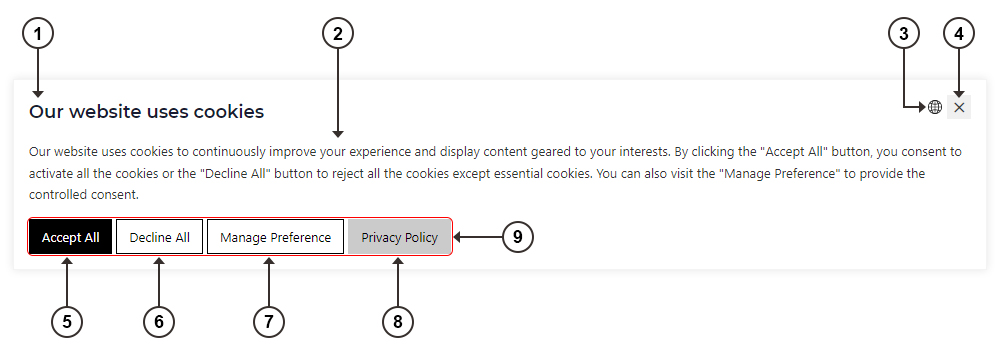
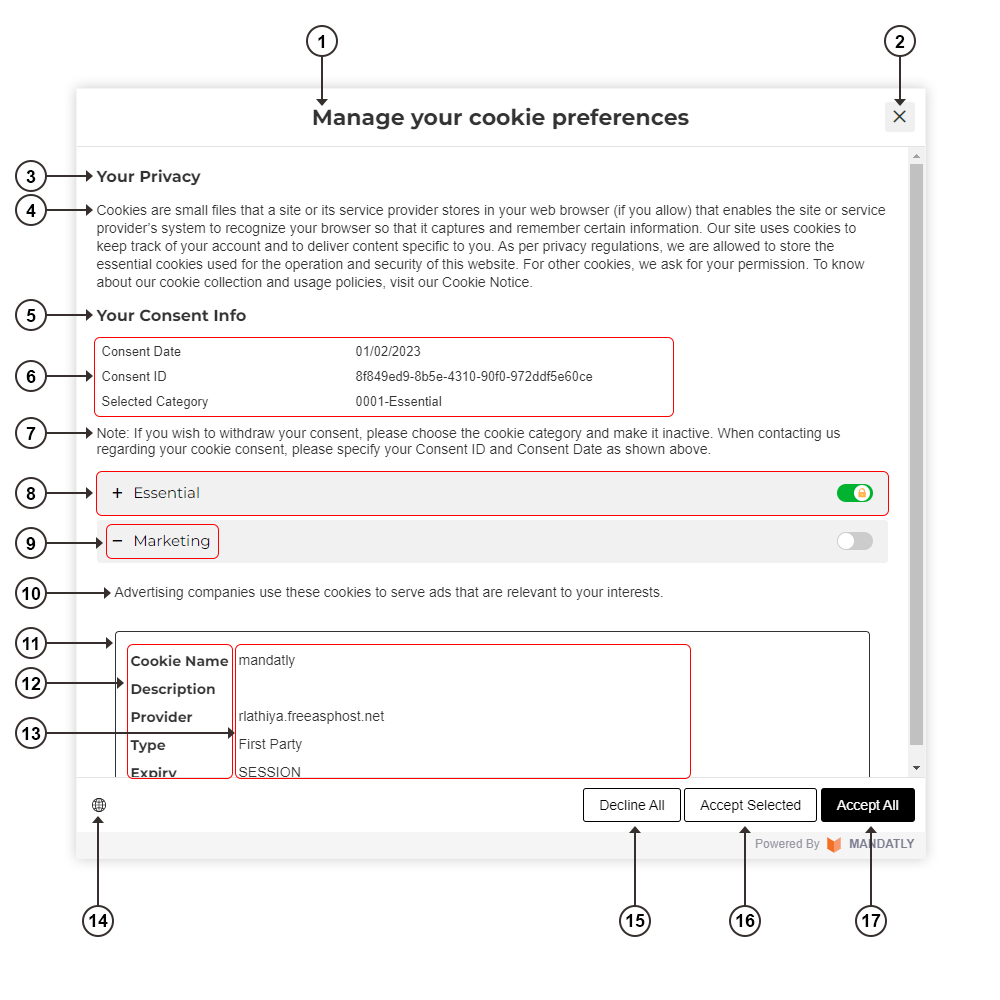
All the elements of Cookie Banner and Manage Preference are marked in the below screenshot with numbers and relevant class and ID name are displayed in the table. In this way, you can apply Custom CSS easily.
Once you apply Custom CSS, used class style will be overwritten.
|
Note: Custom CSS style will be display on live banner only. |
Cookie Banner
|
No. |
Name |
Class Name |
ID Name |
|
1 |
Banner Title |
.mdt-banner-title |
#mdt_banner_title |
|
2 |
Banner Content |
.mdt-banner-notice |
#mdt_banner_notice |
|
3 |
Language icon |
.mdt-banner-select-language |
#mdt_banner_select_language |
|
4 |
Banner Close Button |
.mdt-banner-btn-close |
#mdt_banner_btn_close |
|
5 |
Banner Accept All button |
.mdt-banner-btn-acceptall |
#mdt_banner_btn_acceptall |
|
6 |
Banner Decline All button |
.mdt-banner-btn-declineall |
#mdt_banner_btn_declineall |
|
7 |
Banner Manage Preference button |
.mdt-banner-btn-preference |
#mdt_banner_btn_preference |
|
8 |
Banner Privacy Policy Button |
.mdt-banner-btn-privacy |
#mdt_banner_btn_privacy |
|
9 |
Button Group |
.mdt-banner-btn-wrapper |
|
Cookie Banner - Manage Preference
|
No. |
Name |
Class Name |
ID Name |
|
1 |
Preference Title |
.mdt-pc-title |
#mdt_pc_title |
|
2 |
Preference Close Button |
.mdt-pc-btn-close |
#mdt_pc_btn_close |
|
3 |
Preference privacy title |
.mdt-pc-privacy-title |
|
|
4 |
Preference privacy text |
.mdt-pc-privacy-text |
|
|
5 |
Preference consent info title |
.mdt-pc-consent-title |
|
|
6 |
Preference consent data |
|
#mdt_pc_consent_data table |
|
7 |
Preference consent note |
.mdt-pc-consent-note |
|
|
8 |
Preference category header background |
.mdt-pc-category-header |
|
|
9 |
Preference category name |
.mdt-pc-category-name |
|
|
10 |
Preference category description |
.mdt-pc-category-description |
|
|
11 |
Preference category description table |
.mdt-pc-category-description-table |
|
|
12 |
Preference category cookie info title |
.mdt-cookie-info-details li h5 |
|
|
13 |
Preference category cookie info |
.mdt-cookie-info-details li label |
|
|
14 |
Preference language icon |
.mdt-pc-select-language |
#mdt_pc_select_language |
|
15 |
Preference Decline All button |
.mdt-pc-btn-declineall |
#mdt_pc_btn_declineall |
|
16 |
Preference Selected button |
.mdt-pc-btn-selected |
#mdt_pc_btn_selected |
|
17 |
Preference Accept All button |
.mdt-pc-btn-acceptall |
#mdt_pc_btn_acceptall |
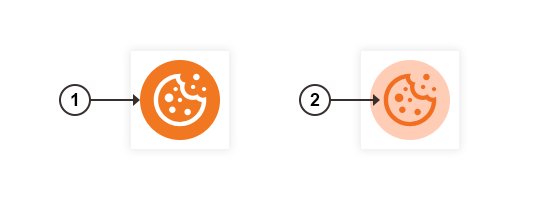
Floating Action Button
|
No. |
Name |
Class Name |
ID Name |
|
1 |
Floating Action button position |
.mdt-cookie-badge |
|
|
2 |
Floating Action button customization |
.mdt-cookie-badge svg |
|